


 Agustus 13, 2015


This is featured post 1 title
Replace these every slider sentences with your featured post descriptions.Go to Blogger edit html and find these sentences.Now replace these with your own descriptions.This theme is Bloggerized by Lasantha - Premiumbloggertemplates.com.

This is featured post 2 title
Replace these every slider sentences with your featured post descriptions.Go to Blogger edit html and find these sentences.Now replace these with your own descriptions.This theme is Bloggerized by Lasantha - Premiumbloggertemplates.com.

This is featured post 3 title
Replace these every slider sentences with your featured post descriptions.Go to Blogger edit html and find these sentences.Now replace these with your own descriptions.This theme is Bloggerized by Lasantha - Premiumbloggertemplates.com.

Tampilkan postingan dengan label Android Software. Tampilkan semua postingan
Tampilkan postingan dengan label Android Software. Tampilkan semua postingan
Kamis, 13 Agustus 2015
MENGENAL "BINATANG" VERSI 2
Minggu, 09 Agustus 2015
GAMES : GEULISH GAME

APLIKASI MENGENAL BINATANG (android)

ANGKLUNG DIGITAL

Kamis, 20 November 2014
Game Android Buatan Indonesia
Daftar Game Android Gratis Buatan Indonesia - Apakah kamu suka bermain game di android? Jika suka, game apa yang kamu sukai? Model game menyebalkan seperti flappy bird atau game balapan mobil yang seru?
Pada kesempatan ini kita mau share game android buatan orang Indonesia yang keren, bagus dan wajib kamu download supaya mereka senang ketika game buatannya di download banyak orang dan bisa terus mengembangkan berbagai macam game lokal yang berkualitas.
Game Android Gratis Tebak Gambar
Sebuah game android terpopuler di google play yang berasal dari tangan-tangan kreatif developer game Indonesia. Kamu diharuskan menebak beberapa gambar yang ada untuk menjadi sebuah kalimat / kata yang terkadang lucu.
Kalimat yang harus kamu tebak terkadang membuatmu tertawa karena gambar yang digunakan benar-benar tidak masuk di akal. Kalau kamu tidak tahu jawabannya, kamu bisa baca kunci jawaban game tebak gambar di android. Tapi kalau pakai kunci jawaban tidak seru lagi deh gamenya.
Download Game Tebak Gambar di Android Gratis
 |
| Game Tebak Gambar di Android |
Kalimat yang harus kamu tebak terkadang membuatmu tertawa karena gambar yang digunakan benar-benar tidak masuk di akal. Kalau kamu tidak tahu jawabannya, kamu bisa baca kunci jawaban game tebak gambar di android. Tapi kalau pakai kunci jawaban tidak seru lagi deh gamenya.
Download Game Tebak Gambar di Android Gratis
Game Endless Runner Beo
Beo merupakan salah satu game android 3D buatan developer lokal yang berasal dari Malang dan bisa kamu download secara gratis. Kamu bisa download game gratis ini tanpa harus membayar sepeserpun. Bahkan kamu disarankan untuk mendownload dan memainkannya, karena dengan begitu mereka bersemangat untuk membuat game lagi.
 |
| Game Beo 3D |
Beo ini secara konsep mirip dengan game flappy bird yang masuk daftar game menyebalkan di android. Namun bedanya, dalam permainan burung beo ini visualisasi yang digunakan adalah 3D dan rintangan yang ada semakin sulit. Ini benar-benar asyik dan keren menurut kami.
Game Edukasi Puzzle untuk Anak-Anak Uwa and Friends
Uwa and friends merupakan sebuah serial animasi edukasi untuk anak yang kini juga hadir dalam bentuk game. Game edukasi anak uwa and friends ini berbentuk puzzle, dimana seorang anak diharuskan menyusun gambar supaya menjadi sebuah kesatuan yang utuh.
 |
| game edukasi untuk anak di android |
Dengan karakter yang lucu dan imut membuat anak suka dalam bermain permainan puzzle ini. Cocok buat para orang tua dan kakak yang mencari game untuk anak-anak.
Download Game Android Gratis Buatan Indonesia
Ketiga game diatas merupakan permainan gratis yang bisa kamu download untuk smartphone android. Bisa digunakan untuk melengkapi koleksi game android yang bagus milikmu. Sebenarnya masih ada banyak sekali game android bagus buatan Indonesia yang akan coba kami bahas pada artikel-artikel selanjutnya.
Bagikan informasi ini ke teman-temanmu supaya mereka mendownload dan memainkan game buatan Indonesia, sehingga para pembuat game ini bersemangat untuk membuat game-game baru yang lebih keren lagi.
Semoga informasi dari aplikasineandroid.com ini bisa membantumu mengenal game-game lokal yang keren. Selamat mendownload dan bermain :)
Rabu, 19 November 2014
Download APK secara Offline
APK (Application Package ) adalah format file untuk aplikasi Android, yang digunakan untuk menginstal aplikasi tertentu pada gadget Android. File .apk ini tersedia di Google Play dan sering disebut dengan App. Jadi untuk menginstal aplikasi tertentu pada gadget Android, kita harus mengakses Google Play, memilih app tertentu, lalu menginstalnya secara online.
Masalahnya, kadang muncul notifikasi bahwa ada aplikasi tertentu tidak tersedia untuk negara kita, atau ada aplikasi terentu yang tidak didukung oleh device Android kita. Contohnya kalau kita mau instal BBM Android, ternyata tidak kompatibel dengan tablet, karena menurut RIM (Research In Motion) aplikasi tersebut hanya tersedia untuk ponsel. Nyatanya kita bisa menginstal apk BBM Android secara offline di tablet dan aplikasinya bisa berjalan normal.
Cara download file .apk dari Google Play
Masalahnya bagaimana cara download file .apk dari Google Play lalu menginstalnya secara offline?
Kita bisa melakukan instalasi offline dan tidak melalui Google Play secara online (sering disebut sideload) menggunakan APK Downloader. Silahkan masuk ke website APK Downloader, maka akan tampil interface seperti ini:
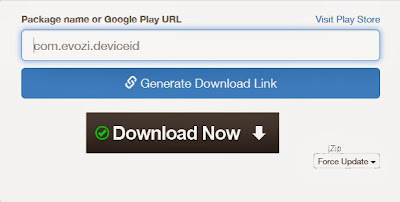
Cara download file .apk begini:
- Masuk ke APK Downloader Chrome Extension, lalu pilih app yang diinginkan. Misalnya saja saya ingin menginstal app Siderbar Plus secara sideload. Lihat alamat teks yang di kotak merah pada screenshot berikut. Copy alamat teks tersebut, lalu pastekan pada website APK Downloader di atas di bagian bawah Package name or Google Play URL

- Lalu klik Generate Download Link
- Klik Click here to download

Saat ini APK Downloader hanya bisa melayani download sebanyak 1400 apk per hari. Kalau kuota telah terlampaui akan muncul notifikasi Error atau Quota limit exceed. Untuk mengatasinya mereka telah membuat Chrome extension untuk download file apk.
Jadi kalau Anda menggunakan browser Chrome bisa langsung download file apk dengan menginstal extension-nya lebih dulu. Silahkan download APK Downloader Chrome Extension.
Bagi yang telah mencoba silahkan share pendapatnya di sini.
Cara Merubah Semua Android Menjadi iPhone 5
Cara Merubah Semua Android Menjadi iPhone 5 – Semua orang pasti sudah tau iPhone 5 dan segudang kelebihannya, dari segi aplikasi memang tersedia sangat banyak di Appstore. Tampilan dari iPhone 5 juga sangatlah menarik menurut saya pribadi karena terlihat unik dan tidak biasa. iPhone 5 belum lama diluncurkan, mungkin baru beberapa bulan yang lalu. Jika anda tertarik dengan tampilannya tetapi sudah terlanjur membeli Android seperti saya. Anda tidak usah khawatir karena Android bisa dirubah menjadi iPhone 5, tapi itu hanya sekedar tampilannya saja. Lumayan lah dari pada tidak bisa sama sekali.
Smartphone memang bisa dirubah-rubah tampilannya begitupun Android. Bahkan Karena Android opensource jadi pengguna bisa memodifikasi menjadi sesuai keinginan, menginstall custom rom, dan apapun yang diinginkan oleh pengguna. Tentunya semua resiko ditanggung sendiri. Namun kali ini saya tidak akan memberi tutorial yang sulit dan beresiko. Hanya dengan aplikasi yang bisa didownload gratis dari Google Plya Store saja kita sudah bisa merubah tampilan Android kita menjadi seperti iPhone 5.
Tidak harus root dulu untuk bisa melakukan hal ini, tidak ada resiko apapun yang membuat kita ketakutan dan mengharuskan flashing jika gagal. Tinggal download launchernya dan kemudian terapkan maka Android sudah berubah menjadi seperti iPhone 5. Launcher ini bernama Fake iPhone 5. Launcher ini mempunyai banyak fitur menarik yang mungkin anda tidak menyangkanya.

Fitur yang tersedia sebagai berikut:
- Setiap ikon memungkinkan Anda untuk membuka Android aplikasi asli atau download jika tidak diinstal
- Fullscreen dengan realistis status bar
- App ukuran lightweighted
- Ikon berkualitas tinggi
- Realistis tampilan dan sentuhan perasaan
- Pilihan Wallpaper ( termasuk memilih sendiri )
- Layar Lock ( beberapa layar kunci )
- Launcher
- Panjang sentuh ikon aplikasi untuk memilih untuk menghapus atau tidak
- Control Center dengan cara pintas fungsional
Pusat Kontrol
- Pusat kendali diakses dengan menggesek atas sederhana dari bagian bawah layar.
Anda memiliki akses cepat ke kamera , lockscreen , kecerahan , jam , kalkulator dan senter .
- Pusat kendali diakses dengan menggesek atas sederhana dari bagian bawah layar.
Anda memiliki akses cepat ke kamera , lockscreen , kecerahan , jam , kalkulator dan senter .
Layar Lock
- Geser untuk membuka : versi iOS 7
- Pincode : iOS 7
Launcher
- Uninstall aplikasi dengan sentuhan panjang
- Peluncuran salah satu aplikasi Anda dari aplikasi ini
Pemberitahuan
- Anda dapat memilih untuk menggunakan pemberitahuan asli android untuk bekerja dengan peluncur sebagai peluncur default Anda
- Anda dapat memilih untuk menggunakan pemberitahuan android asli pada ios 7 lockscreen .
Wallpaper
- Pilih iOS 7 wallpaper
- Atau pilih wallpaper dari perangkat Anda
Download Firmware Smartfren Andromax V ZTE N986 ID Indonesia 4.2.1 Jelly Bean
Leave a reply

Device info:
- Device Model : ZTE-N986
- Date Update : 2013-11-22
- Region Code : ID
- Region Country : Indonesia
- Firmware Version : D2.0.4
- OS Name : Jelly Bean
- OS Version : 4.2.1
- Change List : Unknow
Link download:
New Update:
Firmware Samsung Galaxy Ace GT-S5830 XSE Indonesia
Firmware Samsung Galaxy Ace GT-S5830 XSE
Kembali lagi Sobat LoversCell.Kali ini saya akan bagikan Firmware Samsung Galaxy Ace GT-S5830 XSE Indonesia, Silahkan di download..

Download :
Firmware Samsung Galaxy Ace GT-S5830 XSE Indonesia
Install Android 2.3.6 Gingerbread di Galaxy Ace
Persiapan Install Android 2.3.6 Gingerbread pada Galaxy Ace S5830 Official Firmware
- Download dan Instal driver USB Samsung Galaxy Ace S5830, untuk mentransfer file antara perangkat Android dan komputer.
- Aktifkan mode USB Debugging pada Galaxy Ace S5830 untuk menghubungkan perangkat Android dengan komputer dan menggunakan SDK Android. Baca ini : Cara Mengaktifkan Mode USB Debugging Pada Perangkat Android.
- Tutorial ini mungkin menghapus semua data pada ponsel, backup data yang diarasa penting. Kamu bisa backup menggunakan tools backup yang tersedia di Playstore.
- Galaxy Ace S5830 harus memiliki daya baterai minimal 80% atau lebih! Kenapa? Karena apabila ponsel tiba-tiba mati saat proses install Custom ROM, Mods, Root dsb kemungkinan perangkat Android tersebut akan tidak bisa nyala sementara atau selamanya.
- Galaxy Ace S5830 harus factory unlocked dan tidak terkunci ke operator tertentu saja. Kenapa? Karena jika perangkat Android terkunci/locked pada operator tertentu kemungkinan kalian akan sia-sia mengikuti tutorial ini. Kecuali Android Gila terakan tutorial ini untuk perangkat Android operator tertentu.
- S5830DXKT5 adalah firmware official dari Samsung, bukan firmware modifikasi ataupun custom ROM dan hanya berjalan untuk Samsung Galaxy Ace S5830.
- Cara install Android 2.3.6 Gingerbread pada Galaxy Ace S5830 Official Firmware ini akan menghilangkan hak akses root. Sehingga kalian harus melakukan root ulang setelah proses update selesai, dengan membaca cara root dan install CWM Recovery Galaxy Ace S5830 Android 2.3 Gingerbread.
- Dan pastikan kalian sudah membackup seluruh data penting kalian sebelum proses berjalan.
Cara Install Android 2.3.6 Gingerbread pada Galaxy Ace S5830 Official Firmware
Langkah 1 - Download Firmware S5830DXKT5 Android 2.3.6 Gingerbread untuk Galaxy Ace S5830 ke komputer, lalu extract. Mirror Download -> S5830DXKT5.Langkah 2- Download ODIN v4.42 untuk membantu proses install Galaxy Ace S5830, jangan lupa extract hasil download kalian.
Langkah 3 - Matikan Galaxy Ace S5830 dan masuk ke Download Mode dengan menekan dan menahan Volume Down + HOME + POWER dengan bersamaan.
langkah 4 - Jalankan Odin Multi Downloader pada komputer.
Langkah 5 - Colokkan kabel USB pada Galaxy Ace S5830 kalian untuk menghubungkannya dengan komputer. Sebuah pesan yang mengatakan “Added” akan tampil di bawah kotak pesan Odin. Kamu juga harus melihat COM port dengan nomor dibagian yang berwarna kuning jika perangkat berhasil tersambung.
Catatan : Jika Anda tidak melihat pesan “Added”, kemudian coba port USB lain. Jika itu masih tetap sama silahkan instal ulang driver USB.Langkah 6 - Sekarang pilih file yang ada untuk flash / install di ponsel kamu. File-file ini dapat ditemukan dari file diekstrak pada Langkah 1.
- Klik “PDA” dan memilih file dengan nama “CODE” pada file. Ekstensi file “.tar.md5″ atau “.tar”.
- Klik pada “Phone” dan memilih file dengan nama “MODEM” pada file. Abaikan langkah ini jika tidak ada file tersebut.
- Klik pada “CSC” dan memilih file dengan nama “CSC” pada file. Abaikan langkah ini jika tidak ada file tersebut.
- Klik pada “PIT” dan pilih file .pit. Abaikan langkah ini jika tidak ada file tersebut.
Langkah 7 - Di Odin, centang Auto Reboot dan F. Reset Time. Adapun pilihan Re-Partition, centang jika kalian memilih file .PIT.
Langkah 8 - Klik tombol “Start” di Odin untuk memulai instalasi.
Langkah 9 - Setelah proses instalasi selesai, kalian akan melihat pesan “Pass” dengan latar belakang hijau di kotak paling kiri di bagian atas Odin. Galaxy Ace S5830 kalian akan secara otomatis reboot dan kalian akan segera bisa melihat logo Samsung. Kalian bisa dengan aman mencabut kabel USB dari Galaxy Ace S5830 untuk melepaskannya dari komputer.
Selesai sudah cara install Android 2.3.6 Gingerbread pada Galaxy Ace S5830 Official Firmware dan sekarang Galaxy Ace S5830 kalian sudah berhasil di update ke S5830DXKT5 Android 2.3.6 Gingerbread Firmware Resmi dari Samsung. Untuk mengeceknya silahkan masuk Settings > About phone.Catatan : Jika Galaxy Ace S5830 terjebak di booting animasi (setelah langkah-9) silakan masuk ke recovery mode dan melakukan langkah tambahan dengan memilih wipe data/factory reset, wipe cache partition dan kemudian pilih System Reboot now.
Selasa, 06 November 2012
[Training] Video Belajar Bikin Aplikasi Android
Posted: 06 Nov 2012 02:18 PM PST
bagi sobat blogger mau belajar bikin aplikasi android,silahkan sedot vidio training berbayar dari lynda.com Gratis!!
Dengan Durasi 7 jam 13 menit
klau kuat download monggo.. klau gk kuat jgn salahkan saya :P
HotFile
http://hot*file..com/dl/DepositFiles124491790/60c383d/aad-diSty. part1.rar.html http://hot*file..com/dl/ 124504073/82...part2.rar.html http://hot*file..com/dl/ 124504694/d6...part3.rar.html http://hot*file..com/dl/ 124500614/87...part4.rar.html
http://depositfiles..com/en/Zsharefiles/drq3a5hro http://depositfiles..com/en/ files/owtg7hp75 http://depositfiles..com/en/ files/z7jhs1npt http://depositfiles..com/en/ files/xv8euthr8
http://www.zshare.net/Uploadingdownload/9277541896f908dd/ http://www.zshare.net/ download/9278107529695a05/ http://www.zshare.net/ download/92778833aaad48cd/ http://www.zshare.net/ download/92779212b14acd3e/
http://uploading.com/files/5cm2b1e5/aad-diSty.part1.rar/ http://uploading.com/files/ 4513mf16/...Sty.part2.rar/ http://uploading.com/files/ 95a5d8ad/...Sty.part3.rar/ http://uploading.com/files/ 825me4ce/...Sty.part4.rar/
Video Tersebut mengajarkan beberapa beragam:
- Welcome
47s
- Using the exercise files
48s
- What you should know 1m 29s
- Updates to Android Development Toolkit
8m 14s
- Installing the SDK tools on a Windows machine
4m 12s
- Installing the SDK tools on a Mac
1m 32s
- Installing platforms and samples
3m 11s
- Creating an Android Virtual Device (emulator)
5m 46s
- Installing Eclipse on a Mac
2m 50s
- Installing Eclipse on a Windows machine
3m 56s
- Installing the Android Development Tools 4m 43s
- Preparing an Android device for development
2m 9s
- Overview of Android development
8m 51s
- Understanding project creation and structure
9m 44s
- Working with the AndroidManifest.xml file
4m 27s
- Creating and managing activities
16m 17s
- Using explicit intents
10m 15s
- Using implicit intents
8m 45s
- Creating and using resources
9m 47s
- Understanding security and permissions 7m 2s
- Debugging an app
9m 6s
- Understanding units and layout
7m 11s
- Using layout managers
7m 7s
- Working with text controls
7m 15s
- Building button controls
6m 34s
- Building list controls
7m 12s
- Building custom list layouts 12m 20s
- Other interesting controls
3m 16s
- Creating and using styles 7m 36s
- Creating and using themes 4m 56s
- Creating icons 7m 20s
- Creating NinePatch drawables 8m 9s
- Setting up frame-by-frame animation
8m 56s
- Showing tween animation 10m 22s
- Working in 2D graphics
6m 41s
- Setting up options menus
8m 50s
- Building context menus
7m 16s
- Building alert dialogs
7m 4s
- Setting up progress dialogs 5m 11s
- Creating custom dialogs
4m 58s
- Setting up audio playback
4m 0s
- Establishing video playback 5m 11s
- Accessing the camera and camera roll
7m 59s
- Using shared preferences
8m 41s
- Creating a preferences activity
9m 4s
- Using the SQLite database
8m 47s
- Setting up network access 10m 25s
- Using ContentProviders
6m 38s
- Preparing for publishing
4m 3s
- Signing and building
3m 32s
- Preparing the graphics 3m 34s
- Publishing to the Android Market
7m 42s
Kamis, 18 Oktober 2012
Install Game Android di Netbook dan Laptop?
Saat orang lain asik bermain game Android di Galaxy Young atau Galaxy
S3, apakah Anda hanya diam dan melihat mereka yang lagi asik bermain
game? Sebenarnya ingin juga sih main game Android, tapi apa daya Anda
tidak memiliki hp Android. Jangan khawatir, meskipun Anda tidak memiliki
hp Android, kini Anda bisa memainkan game Android seperti Bad Piggies,
Angry Birds Space, ataupun Talking Tom di laptop atau netbook Anda.
Penasaran kan bagaimana cara bermain game Android di Laptop atau
Netbook? Berikut ini adalah tips singkatnya.
Pertama, silahkan download dulu Bluestacks App Player di
http://goo.gl/sRktV yang merupakan sebuah program Windows/Mac yang
nantinya bisa dijadikan sebagai emulator untuk menjalankan Game atau
Aplikasi Android. Ukurannya filenya cukup besar yakni sekitar 100MB,
setelah selesai di Download, selanjutnya instal Bluestacks App Player di
Laptop atau Netbook Anda.
Kini, saatnya Anda bermain game Android di Netbook. Pertama cari file
APK dari game Android yang sudah Anda download sebelumnya, selanjutnya
double klik file APK tersebut, sehingga nantinya akan terinstall secara
otomatis di Bluestacks App Player.
Untuk mulai bermain game Android di laptop, Anda langsung jalankan
Bluestacks App Player. Klik pada menu My Apps untuk melihat aplikasi
atau game Android apa saja yang sudah terinstall dan bisa dimainkan oleh
Anda.


Untuk mulai memainkan game Android, Anda tinggal klik saja pada daftar
aplikasi atau game yang ada di layar semisal kita akan memainkan Bad
Piggies, tinggal klik icon game tersebut, tunggu sebentar untuk proses
loading, dan jreeng… Anda pun bisa mulai bermain game Android di Netbook
tanpa harus menggunakan ponsel Android. Mudah bukan? Selamat bermain
game!
Aplikasi Android untuk Download Youtube Video
Siapa yang tak kenal Youtube? Bagi Anda pencinta video, entah itu movie trailer, video clip lagu, sampai video lucu dan unik, tentu saja akan kenal dengan yang namanya Youtube, karena di Youtube kita bisa mendapatkan dan menonton berbagai video terbaru, terkini dan terupdate.
Anda ketinggalan Gol Ronaldo di pertandingan Real Madrid, atau gol
Lionel Messi? Jangan khawatir di Youtube pun kita bisa melihat video
cuplikan gol terbaik dan terbaru, atau Anda ingin melihat tingkat unik
dan lucu binatang seperti kucing, kelinci ataupun panda? Di Youtube
sudah tersedia banyak sekali.
Jika Anda menggunakan ponsel Android, baik itu Ponsel Android Galaxy S3
ataupun sekedar Galmin atau GalPoc? Tentu saja Anda bisa dengan mudah
akses Youtube, apalagi jika didukung dengan koneksi internet sekelas
HSDPA, maka nonton Video Youtube di Android tanpa Buffering.
Namun, ada kalanya selain sekedar hanya nonton video Youtube, kita juga
ingin download video tersebut? Nah, jika sebelumnya Anda sudah
mengetahui Bagaimana Cara Download Video Youtube di Android, sekarang
ini akan diperkenalkan kepada Anda aplikasi Android untuk Download Video
Youtube.
Beberapa aplikasi Android untuk Download Youtube yang bisa pilih
diantaranya TubeMate, Wontube, sampai Droid Youtube Download. Dibawah
ini adalah proses Download Video Youtube menggunakan Wontube.

Bila Anda mengalami kesulitan dalam mendownload video youtube di Android, bisa ikuti cara mudah download Youtube Video di Android. So, kini apapun videonya, Anda bisa dengan mudah Download Video tersebut dan menyimpannya di SD Card ponsel Android Anda.
Cara Download Video Youtube di Android
Dengan memanfaatkan software buatan pihak ketiga, video yang tidak bisa didownload menjadi bisa di unduh dengan mudah dan cepat, misalnya lewat IDM, youtube downloader dll. Di HP ber OS Android, kita juga bisa download youtube sepuasnya. Lagi - lagi harus menggunakan perantara pihak ketiga untuk bisa mendownloadnya yaitu dengan Applikasi Tubemate. Jika sahabat setia tidak menemukan Tubemate di Androit market, bisa kunjungi link berikut tubemate
 |
| Tubemate video youtube downloader for android |
- Download video dan streaming video secara bersamaan
- Fitur resume dan paus pada waktu download berlangsung
- Download dengan format HD dan MP3/ hanya Audio
- Bisa berbagi video favorit ke berbagai sosial media
Demikianlah tips sederhana download video youtube, semoga apa yang disajikan zona aneh diatas dapat bermanfaat buat sahabat setia khususnya yang mempunyai handphone Android murah, yang sekarang mungkin lagi bingung, bagaimana cara download video di HP nya. Wassalam
Kamis, 20 September 2012
Cara Menjalankan Android Ice Cream Sandwich di Komputer Anda

- Android versi 1.1
- Android versi 1.5 (Cupcake)
- Android versi 1.6 (Donut)
- Android versi 2.0/2.1 (Eclair)
- Android versi 2.2 (Froyo: Frozen Yoghurt)
- Android versi 2.3 (Gingerbread)
- Android versi 3.0/3.1 (Honeycomb)
- Android versi 4.0 (ICS :Ice Cream Sandwich)

advertisements
1. Download dan Instal Java SE JDK yang terbaru:
http://www.oracle.com/technetwork/java/javase/downloads/jdk-7u1-download-513651.html
Pilih Java 7 SE JDK sesuai dengan Sistem Komputer yang anda gunakan. Disini saya menggunakan Windows x86.

2. Download dan Instal Android SDK yang terbaru:
http://developer.android.com/sdk/index.html
Disini saya menggunakan Package yang (Recommended).

3. Ikuti petunjuk proses instalasi Android SDK.


4. Jika Android SDK telah terinstal, check “Tools”, “Android 4.0 API 14″, dan “Extras” kemudian klik “Install Packcage”.

5. Akan muncul Window “Choose Packages To Install” pilih Accept All dan klik Install.

6. Setelah terinstall restart Android SDK dengan mengclose window Android SDK dan membukanya kembali. Kemudian klik Tools > Manage AVDs.

7. Kemudian akan muncul Android Virtual Device Manager, klik New dan isi form sesuai dengan gambar dibawah ini.

8. Yang terakhir anda tinggal mengklik tombol Start dan Launch. Akan membutuhkan proses yang lama pada saat Android dibuka.


Taratatataaaaa….Kini anda telah memiliki Android Ice Cream Sandwich di komputer anda. Jangan lupa berbagi pengalaman anda setelah mencoba android ice cream sandwich ini. Selamat mencoba :)
Rabu, 29 Agustus 2012
Some of the Best Android Apps of 2012 – So Far
by Matthew Sabatini on Feb 14, 2012 with 61 Comments

Applications have come a long way, and now, a smartphone or tablet would be nothing without apps. As such, we’ve collected 25 of the best Android apps, both free and paid. From essentials to games, these apps will keep you glued to your smartphone and maybe even make your day a little better and easier.
We’ve also created a comprehensive three-part video series so you can see the apps in greater detail. Check out the videos below.
Video Review Part 1
http://youtu.be/oy0xD0lYzYkVideo Review Part 2
http://www.youtube.com/watch?v=20eETNtFP3wVideo Review Part 3
http://www.youtube.com/watch?v=M_PeUT2RpEMContinue reading to know more about some of the best Android apps of 2012.
Cut The Rope
By: Zepto Lab
After purchasing the game for 99 cents, you will be able to play 250 levels of Cut the Rope with “New Levels Coming Soon”. New boxes (groups of 25 levels) are released about every few months, and the game itself is highly addicting.
http://www.youtube.com/watch?v=1JpdW-D6c14
Price: $0.99
Requires Android: 1.6+
Download: Cut the Rope on Google Play Store
Voxer Walkie-Talkie
By: Voxer Have
you ever wanted to skip dialing phone numbers and waiting on hold? If
you’re looking to turn your phone into a “push to talk” live
walkie-talkie, then Voxer is the app for you.
Voxer gives your Android 2.2+ device the ability to instantly talk with your friends and family over Wi-Fi, 3G, 4G, EDGE, etc. In addition, if you can’t talk, the voice, text, photo and location options are all seamlessly integrated into one conversation.
The app works like a real walkie-talkie. When the other person speaks, you hear it almost instantly. And, if you’re not near your phone, every voice and chat message is saved for later playback. Voxer also boasts 0 advertisements and group chats. Everything is completely free and is cross-platform between iPhone and Android. Over 5 million people have downloaded the app already on Android alone. When you download Voxer, you can sync with your Facebook account to see if your friends use Voxer and also to let them know that you now have the app.
http://www.youtube.com/watch?v=fDuyDajOSYI
Price: Free
Requires Android: 2.2+
Download: Voxer Walkie-Talkie on Google Play Store
Speedtest.net
By: Ookla It
seems like a new type of “G” comes out every year. To see how your
internet connection stacks up, Speedtest.net has always been the #1
testing program.
The app is available on all Android 1.6+ devices and is 100% free. Upon downloading Speedtest.net, you will be able to test your ping and download and upload speeds. In addition, the app automatically saves every test that you record on your device, along with the type of data connection (Wi-Fi, 3G, etc.), the date the test took place, and all of the recorded information. Finally, if you’re all about your data speeds, Speedtest.net even allows you to export your results as a CSV file right from your Android device.

Price: Free
Requires Android: 1.6+
Download: Speedtest.net on Google Play Store
GifBoom: Animated GIF Camera
By: Tapmojo LLC GIF
(Graphics Interchange Format) images allow pictures to come to life
through animation. In simple terms, a GIF image allows several “frames”
to be lumped into one image and displayed one after another, resulting
in an animation.
GifBoom: Animated GIF Camera brings GIF image creation to Android in a very simple and easy to use app. The app will “Wow your friends with high-res, cool Animated GIFs!”
The app takes a bunch of pictures at a set shutter speed. Then, after you have chosen the pictures you would like to use (including access to your local photo gallery), GifBoom quickly turns those photos into an animated GIF. Finally, you can play that animation backwards and forwards in addition to “One Tap Instant sharing to Facebook, Twitter, Tumblr, Email and MMS”.
Price: Free
Requires Android: 2.2+
Download: GifBoom: Animated GIF Camera on Google Play Store
Shazam
By: Shazam Entertainment Limited Have
you ever heard a song on the radio that you just can’t remember the
name of? Shazam for Android will be able to identify that song almost
instantly. The app truly works like magic!
After Shazam has identified your song, you can listen to a 30-second preview, share it, play it in Spotify, get tour info, and even see full screen lyrics of the song with LyricPlay. Shazam has become so popular that you can even tag TV shows and advertisements when you see the Shazam logo. Despite there being a paid version of the app (Shazam Encore), the free version offers unlimited tagging. However, if you want to free yourself of advertisements and also contribute to the Shazam creators, you can buy the paid version for $4.99.
http://www.youtube.com/watch?v=BJzCyaE6eKQ
Price: Free/$4.99
Download: Shazam Free on Google Play Store; Shazam Encore on Google Play Store
Light Flow
By: Rage Consulting Limited One
of the best yet underrated features of most Android devices is their
LED notification light. Devices such as the Galaxy Nexus and original
Motorola Droid feature LED notification lights. To fully unlock the
potential of this notification system, you have to take control with
Light Flow.
Both versions of Light Flow work without root access and support a wide variety of notification types. While the lite version will only allow you to control the color of basic notifications (SMS, e-mail, missed calls, etc.), the full version of Light Flow allows for “about 140 different notifications”. Both versions also allow for custom notifications by contact.
The two versions vary greatly, and to see a comparison, look at this incredibly long list of the differences between the free and paid versions.
http://www.youtube.com/watch?v=fDuyDajOSYI
Price: Free/$1.99
Requires Android: 2.2+
Download: Light Flow Lite on Google Play Store; Light Flow on Google Play Store
SMS Popup
By: Adam K Notifications
are great. And, now that you know how to control the LED light with
Light Flow, the SMS Popup app, along with Light Flow, will create an
incredible notification tag team.
SMS Popup is a free application that displays your incoming SMS messages in a nice “popup” dialog. In addition, the app allows for custom notifications by contact and has convenient buttons located just below the message. After receiving a message, SMS Popup puts you one tap away from sending a quick reply. Furthermore, after you close the popup box, the message is automatically marked as “read”. An optional privacy mode is available to hide the sender’s name and message contents.

Price: Free
Requires Android: 1.5+
Download: SMS Popup on Google Play Store
Chrome Beta
By: Google If
you’re a true fan of Android’s daddy Google, you would be quite
familiar with the Chrome series. Chrome has evolved from a web browser
(number 2 most used) to an operating system (for “Chromebooks”). And
now, soon after the release of Ice Cream Sandwich, Chrome has become a
mobile web browser.
Chrome has become famous for its speed, simplicity, and syncing capabilities. Furthermore, Chrome Beta for Android features Google’s signature omnibox (the single search bar for web history, Googling stuff, bookmarks and more). Omnibox only takes up about a 1/4″ of the screen. If you’re familiar with Chrome, you know that above the omnibox is all of your open tabs. Google knows that you want to maximize your screen and has taken the standard tab system away. In its place is a very cool swiping feature that is similar to a deck of cards. The gestures are subtle, fast, and work with an unlimited amount of tabs.
Finally, you can sync up your Google account and see all of the tabs that you have open on any other one of your Chrome devices.
http://www.youtube.com/watch?v=lVjw7n_U37A
Price: Free
Requires Android: 4.0+
Download: Chrome Beta on Google Play Store
Chrome to Phone
By: Google If
you’re an avid Chrome user on your laptop or desktop computer, chances
are that you want to be able to take your Internet with you on your
mobile device. Chrome Beta for Android offers the ability to see all of
your open tabs on your computer. However, if you don’t have Ice Cream
Sandwich, Chrome Beta is out of the picture.
Therefore, Chrome to Phone allows you to click one button on your computer in Chrome, and the website is instantly sent to your phone as a notification. When you’re ready, simply click the notification and Chrome to Phone will open the link in your default browser on your phone. Voila! It is instant and magical.
If you are interested in sending websites in the opposite direction, from your phone to Chrome, download Phone 2 Chrome from the Android Market.
http://www.youtube.com/watch?v=pQb243niMlg
Price: Free
Requires Android: 2.2+
Download: Chrome to Phone on Google Play Store
ColorNote
By: Notes A
lot of people claim to have “photographic memories”. But for the rest
of us, even the most important things go in one ear and out the other.
ColorNote is the best notepad experience for your Android device.
ColorNote allows you to write text, checklists, and notes and also assign each note a different color. If you’re keeping secrets, you can also lock your notes from outsiders. Furthermore, if writing a note simply is not good enough to help you remember daily tasks and other info, ColorNote allows you to set reminders and even pin a notification to your status bar. Finally, ColorNote even allows you to stick your notes to your homepage with the ColorNote widget.
http://www.youtube.com/watch?v=tQCKCSS9eAM
Price: Free
Requires Android: 1.5+
Download: ColorNote on Google Play Store
Movies
By: Flixster When
you’re out and about and away from your newspaper (the old-fashioned
way to get movie times), Flixster is the #1 app to get instant movie
times, movie trailers, reviews, and more.
Flixster lets you search for movies by what’s coming out soon or by your favorite local movie theater. On the way to the movie theater, Flixster lets you play the trailer, view photos, and even rate the movie. After the movie, when you’re dying to find out when you can get the movie on DVD, Flixster has a section with a list of movies and their DVD release dates.

Price: Free
Download: Movies on Google Play Store
PdaNet
By: June Fabrics Tech Internet
tethering has been around since Android 2.2 Froyo. However, after the
idea of sharing your phone’s data with other devices became popular,
wireless providers started to charge a fee on top of the regular monthly
fee.
The PdaNet software shares your phone’s Internet connection with your computer and does not require rooting your phone. To share with your connection with your computer, you can download the PdaNet desktop client. June Fabrics also released an application for tablets that makes it easier to share data to your Android tablet. PdaNet adds zero latency to your connection so your computer connects as fast as your phone’s Internet speed, such as 4G or even 100 Mbps Wi-Fi.

Price: Free
Requires Android: 1.5+
Download: PdaNet on Google Play Store
TV Listings
By: TV24 Group TV Listings is simply the best application on the Google Play Store for finding out what is on TV.
TV Listings supports over 13,000 channels and over 100 service providers. If you’re looking to see what is on TV later at night, this application makes it easy to check the full schedule for each channel. Once you have found your program, you can set a reminder so you don’t forget to tune in. Finally, TV Listings also displays lists that are specific to movies and sports.

Price: Free
Requires Android: 1.6+
Download: TV Listings on Google Play Store
Words with Friends
By: Zynga Games
have always been a cornerstone of the Android app market. And, being
able to play with your friends has made games even more addicting than
ever.
One of the most popular games on the Google Play Store is Words With Friends. The game has the same idea as that of Scrabble. After signing up for an account and registering with your Facebook account, Word with Friends will be able to tell you which of your friends are playing.
If you enjoy word games and being able to play with your friends, Zynga has also made Hanging with Friends for Android (Hangman) and will also be releasing Scramble with Friends very soon.

Price: Free
Download: Words with Friends on Google Play Store
Google Music
By: Google Android users have not had a definite platform for listening to and buying music until now.
Google Music is a music player and storage service that lets you keep your music collection online so you can save space on your Android device. Best of all, if you’re going to be without Internet connection, Google Music lets you save any or all of your songs and playlists locally for offline playback. Furthermore, Google Music offers the easiest connection between the Google Music Store and your Android devices. You can also upload up to 20,000 songs straight to Google Music from your computer and listen to all of your songs and music from any Internet-connected device.
The Google Music interface also completely destroys its competition. Google Music is definitely the best Android music player out there.
http://www.youtube.com/watch?v=ZrNhKcxBbZo
Price: Free
Requires Android: 2.2+
Download: Google Music on Google Play Store
The Weather Channel
By: The Weather Channel The Weather is unpredictable. So when you’re out and about, you need instant access to the forecast around you.
The Weather Channel is one of the best weather applications–if not the best–on the Google Play Store. The app is easy to use and offers a wide variety of information. After inserting your location, The Weather Channel will instantly load the current weather. In addition to being able to add multiple cities to your home page for quick access, you can also click the “Maps” button to get a radar map with different layers and modes.


Requires Android: 2.1+
Download: The Weather Channel on Google Play Store
Flick Kick Field Goal
By: Pik Pok Flick
Kick Field Goal brings all of the pressure of being a field goal kicker
to the Android. Flick Kick has quickly become one of the most popular
games on the Google Play Store. Furthermore, within several game modes,
the objective of the game is to flick the football in between the
uprights (the two poles on the field goal).
While you are playing the game, wind and distance will constantly try to knock the ball away. But, with the right amount of power and angle from your finger, you can beat all 3 game modes and your friends.

Price: Free
Requires Android: 2.0+
Download: Flick Kick Field Goal on Google Play Store
ESPN ScoreCenter
By: ESPN Inc. Calling
all sports fans! ESPN ScoreCenter will keep you up to the minute with
your favorite sports teams and leagues no matter where you go. Whether
you’re checking live game stats and box scores, or discovering this
year’s standings, ESPN ScoreCenter has it all for “over 100 sports
leagues”.
ScoreCenter also allows you to save your favorite teams in the myTeams section for instant access. In addition, ESPN’s round-the-clock editorial staff gives you breaking news, analysis, and video clips.

Price: Free
Requires Android: 2.1+
Download: ESPN ScoreCenter on Google Play Store
Wikipedia
By: Wikimedia Foundation Wikipedia,
the Free Encyclopedia, has become known as the Internet’s #1 source of
information. Wikipedia has been accessible from mobile devices since
2004. However, the true mobile website for smartphones did not come out
until 2007.
Now, with the Wikipedia app for Android, you can get all of the information Wikipedia has to offer in a very easy to use application. The Wikipedia app houses over 20 million articles in 280 languages. If you find an interesting article that you want to keep on your phone, the app allows you to save it for offline reading. If you’re multilingual, Wikipedia for Android allows you to read any article in any other language.

Price: Free
Requires Android: 2.2+
Download: Wikipedia on Google Play Store
Home Switcher
By: ymst If
you enjoy downloading and playing with multiple launchers, including
your standard Android one, Home Switcher is an app that you must have.
Home Switcher lets you see all of your installed launchers (homes) and pick which one to open. In addition, Home Switcher allows you to choose which launcher you want to set as your default one. For example, when you press the home button on your phone, this launcher will come up.
If you’re still puzzled about what a launcher is, check out Go Launcher EX, SPB Shell 3D, or LauncherPro.
Price: Free
Requires Android: 1.5+
Download: Home Switcher on Google Play Store
Battery Indicator
By: Darshan Computing, LLC Have you ever noticed that the standard Android battery indicator does not include the percent battery remaining?
Battery Indicator shows your battery charge level (percent) as a small icon on your notification bar, with battery temperature, health, voltage, and time since it was plugged / unplugged. Battery Indicator is the best way to find out exactly how much battery you have left without opening the Settings menu or other applications. It is very simple, does not have any advertisements, and displays the battery percent in 1% increments for accuracy.

Price: Free
Requires Android: 1.5+
Download: Battery Indicator on Google Play Store
Iris
By: Dexetra Surely,
we have all heard of Siri, Apple’s personal assistant that is sweeping
the nation. Although it is definitely not the first of its kind, it does
offer the ability to decipher your sentences rather than only accepting
certain commands.
Iris, Siri spelled backwards, was released soon after Siri and even the developers claim that it is a Siri clone. Iris allows you tell your phone to
- Call or text someone
- Search nearby locations
- Play music
- Find news
- And many more
http://www.youtube.com/watch?v=77B8DF0XMGc
Note: You need to have “Voice Search” and “TTS library” installed in your phone for Iris to work. Most phones have these pre-installed; if not, please install them from the Google Play Store before you try Iris.
Price: Free
Requires Android: 2.1+
Download: Iris on Google Play Store
Lookout Mobile Security
By: Lookout Mobile Security By now, most Android users are aware of malware, spyware, and trojans that exist even on the Android platform.
Lookout Mobile Security is like an antivirus program for your Android device. Whenever a new app is downloaded and installed, Lookout will automatically scan it to ensure that it is safe. However, Lookout is not bulky or annoying like most antivirus programs and runs mostly in the background.
In addition, by going to myLookout.com, users can find their phone (even if GPS is off) and activate a loud alarm, even if your phone or tablet is on silent mode. If you’re looking to keep your Android device safe, Lookout is the way to go.
http://www.youtube.com/watch?v=Jh7anr-Df9E
Price: Free
Requires Android: 1.5+
Download: Lookout Mobile Security on Google Play Store
Beautiful Widgets
By: LevelUp Studio Widgets have always been the centerpiece of the Android platform.
Beautiful Widgets is a set of custom widgets that include clock, weather, date, and toggle widgets. Beautiful Widgets will completely enhance your home page in addition to giving you instant access to the most important information without having to open any app.
Each widget is customizable in size and can be combined with 300 skins to ensure that the widgets fit in with the rest of your phone. LevelUp Studio is so confident that you will love Beautiful Widgets that they are extending the refund policy from 15 minutes to 24 hours.
http://www.youtube.com/watch?v=vRkd9hAn_Z0
Price: $2.89
Requires Android: 1.6+
Download: Beautiful Widgets on Google Play Store
SPB Shell 3D
By: SPB Software One
of the best features about Android is having total control of
customization. More specifically, launchers and skins give Android users
access to tons of new user interfaces and also features.
Putting aside some of the more well-known launchers, SPB Software recently release SPB Shell 3D. The app, which will cost you $14.95 in the Android Market, will bring a whole new look and feel to your Android 2.1+ device. Over 100,000 people, including us, have already downloaded the launcher. Don’t be scared off by the steep price tag — SPB Shell 3D packs dynamic folders, custom widgets and panels, sweet animations, and a full 3D experience. Once you download this app, no additional skins or plugins are needed.
http://www.youtube.com/watch?v=hVU84J1ShSQ
Price: $14.95
Requires Android: 2.1+
Download: SPB Shell 3D on Google Play Store
Even more apps

If you are as crazy about high quality apps as we are, be sure to check out our expert curated app lists below. The Google Play Store is often a daunting place to find what you are looking for. Check them out! Let us know if there is a type of app you are looking for, or if you would like a list created, too.
New and fresh apps
- New and fresh Android apps of the week (August 17 issue)
- New and fresh Android apps of the week (August 10 issue)
- New and fresh Android apps of the week (August 4 issue)
- New and fresh Android apps of the week (July 28 issue)
- Best new Android games (mid-August edition)
- Best new Android apps of the month – July issue
Customizing and personalizing Android
- Excellent keyboards for Android
- Best homescreen launcher apps for Android
- Best Android widgets for the Samsung Galaxy Note
- Best Android apps for personalizing and customizing your phone
- Best Android tablet keyboards compared: Adaptxt vs FloatNSplit vs Swiftkey 3 vs Thumb keyboard
- Best Android keyboards for smartphones compared: Adaptxt vs Swiftkey X vs SlideIT vs stock ICS
- Best keyboard apps for Android phones and tablets
- Best note widgets for Android tablets
- Best HD live wallpapers for Android phones and tablets
- Best paid live wallpapers for Android phones
- Best paid live wallpapers for Android tablets
- Best battery widgets for Android phones and tablets
- Best aquarium and fish live wallpapers for Android
- Some excellent keyboards for Android
Education, learning, and references
- Best general reference apps for Android
- Best Android apps for Bible study
- Best Android apps for learning Spanish
- Best Android apps for ESL students and learning English
- Best Android apps for learning French
- Best phrasebook apps for Android
- Best translator apps for Android
- Best Android apps for learning math
- Best Android Apps for learning music
- Best Android apps for improving vocabulary
- Best quiz apps for Android
- Best Android apps for college students
- Best Android apps for high school students
- Best apps for nerds, geeks, and the info-adventurous
Home, family, and kids
- Best Android apps for children and kids
- Best Android apps for fathers and dads
- Best Android apps for mothers and moms
- Best interactive books for Android
- Best Android apps for hobbyists and DIY enthusiasts
Health and wellness
- rel="430d44bc x_url" target="_blank">Best Android apps that can help you get motivated
- 10 best Android apps for your health
- Best Android apps for brain training and exercise
- Best Android apps to help you sleep
- Best Android apps for meditation and relaxation
- Best Android apps for improving memory
- Best inspirational and motivational apps for Android
- Best Android apps for staying healthy
Sports and physical fitness
- Best Android apps for getting flat, chiseled, six-pack abs
- Best Android apps for biking and cycling
- Best Android apps for runners
- Best Android apps for baseball fans
- Best Android apps for basketball fans
- Best Android apps for soccer and football fans
- Best Android apps to help you get in shape and have a sexy body
- Best Android apps for strength training and weight lifting
Games
- 10 best pinball apps for Android
- 10 best gangster games on Android
- 10 HD games on Android you should try
- 7 best social games on Android
- Top 10 Android action games
- 7 must-try multiplayer games for your Android device
- Best simulation games for Android
- Best Android card games
- Best cooking games for Android
- Best ninja games for Android
- Best dice games for Android
- Best zombie games for Android
- Best movie game apps for Android
- Best solitaire games for Android
- Best virtual pet apps for Android
- Best scrabble games for Android
- Best Android puzzle game apps
- Best retro and classic games for Android
- Best addictive free games for Android
- Best Sudoku apps for Android
- Best role-playing games (RPG) for Android
- Best augmented reality (AR) games for Android
- Best board games for Android
Lifestyle, leisure, and entertainment
- Best fashion and style apps for Android
- Best fun and humor apps for Android
- Best Android apps to buy comics
- Best Android apps for book lovers
- Best Android apps for poets and poetry lovers
- Top 5 ebook reader apps for Android phones or tablets
- Best astrology apps for Android
- Top 5 Android media players
Music and audio
- Best Android pocket music box apps
- Best music apps for Android
- Best music and MP3 downloader apps for Android
- Best karaoke apps for Android
- Best Android apps for guitarists and guitar players
- Best Android apps for singers
- Best sound and audio equalizer apps for Android
- Best music recognition apps for Android
Video, TV, and movies
- Best free apps to stream videos from PC to Android phone
- Best Android apps for streaming on-demand videos
- Android apps that will turn your Android into a TV
- Best Android apps for TV lovers and couch potatoes
- Best Android apps for videographers and video editors
Safety, security, and privacy
- Best Android apps for privacy protection and security
- Best Android apps for child safety
- Best Android apps for emergencies and disasters
Food and drink
- Best Android apps for coffee lovers
- Best Android apps for vegetarians and vegans
- Best Android apps for cooking and dining in
- Best Android apps for foodies and food lovers
- Best Android apps for cooks and kitchen use
Driving, navigation, and travel
- Best compass apps for Android
- Best Android apps for finding cheap gas
- Best Android apps for finding cheap flights
- Best Android apps for finding cheap hotels
- Best Android apps for tourists
- Best Android apps for the prepared road warrior
- Best travel apps for Android
Buying, selling, and shopping
- Best Android apps for buying or selling on Craigslist and eBay
- Best Android apps for finding gifts
- Best Android apps for shoppers to find best deals
- 6 helpful Android shopping apps
Notes, lists, organizers, and personal finance
- Best grocery list apps for Android
- Best Android apps for getting things done
- Best Android apps for personal financial management
- Best Android apps to stay organized and systematic
- Best note-taking apps for Android
Cameras and photos
- 10 must-try photo-sharing apps on Android
- Best HDR camera apps for Android
- Best photographer’s kit Android apps
- Top free photography Android apps you’ll love
- Fun Android photo apps
- Best retro photo apps for Android
Art and creativity
- Best Android apps for freehand drawing or doodling
- Best Android apps for awakening and unleashing your creativity
Tools and utilities
- Top 3 remote desktop apps for Android
- Best file explorer and file manager apps for Android
- Best alarm clock apps for Android
- Best Android apps for ZIP and RAR files
- Best calculator apps for Android
- Best specialized calculators and converters for Android
- Best Android apps for boosting mobile network and Wi-Fi signals
- Best remote access apps for Android
- Best Android apps to replace laptops
- Top 8 best free location-aware Android apps
- Seven major alternatives to Google Drive
- Best Android apps for the blind and visually impaired
- Best Android apps for your Samsung Galaxy Note’s S Pen
- Best speed booster apps for Android
Online and social life
- Top 6 best blogging apps for Android phones and tablets
- Top 5 best social media apps for your Android smartphone
- Best social media apps for Android
- Best e-card apps for Android
- Best Android apps to wow your friends
- Best apps to make your Valentine’s Day fun and memorable
- Best Android apps for finding yourself a date, boyfriend, or girlfriend
Work, career, and the professions
- Best Android apps for writers
- Best Android apps for public speakers
- Best Android apps for doctors, physicians, and medical practitioners
- Best Android apps for teachers, tutors, and educators
- Best Android apps for lawyers and attorneys
- Best Android apps for scanning business cards
Hobbies and personal interests
- Best Android apps for astronomy enthusiasts and stargazers
- Best Android apps for science lovers
- Best Android apps for pet lovers